

Build a workflow
JSON cookbook: dual graph, nodes, variables, sub-nodes, pointers. Author and save via this site’s MCP at docs.pingmee.co.il/mcp.
Workflow board UI
Optional. Node catalog and board screens live on Workflow Docs. Not required to assemble or persist a workflow.
When authenticating a request, you should send a
Cookie header instead of an Authorization header.Authentication & Headers
Our platform is built using multiple microservices. Each request must include the following two headers:Cookie– Your personal access tokenx-api-key– Your business API key
Where to find your token and API key
- Open the Pingmee app
- Go to Settings (gear icon in the sidebar)
- Select Developer Tools (
כלים למפתחים)
- Personal token – use this value in the
Cookieheader. You can regenerate it at any time. - API key – use this value in the
x-api-keyheader on every API call.
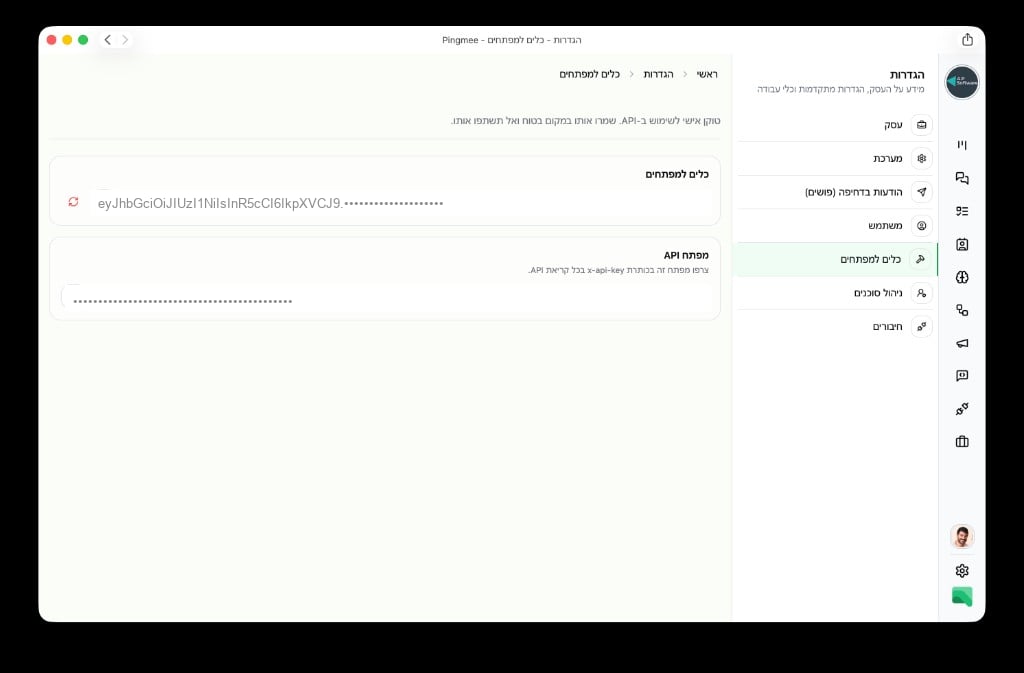
Required Headers
Rate Limits
Rate limits depend on your business subscription plan. Limits apply across all Pingmee API services combined.Public Services
-
Core:
https://api.pingmee.co.il -
AI:
https://ai.pingmee.co.il -
Business:
https://business.pingmee.co.il -
Campaigns:
https://campaigns.pingmee.co.il -
Workflows:
https://workflows.pingmee.co.il